IS Operations & Business Resilience
Keep the lights on — and know what to do when they go out. The largest CISA domain, covering everything from daily operations to disaster recovery.
Alex's Week 4 — The Payday Outage
Alex survived three weeks of planning, governance reviews, and a runaway development project. This week was supposed to be quieter — an audit of IT operations and business continuity. Then at 9:47am on a Friday, the payroll system went down. Alex closed her laptop and walked to the server room. This was going to be the most educational Friday of her career.
Domain 4 Overview
Part A: Operations (4.1–4.6)
- 4.1 IT Operations
- 4.2 Hardware & Infrastructure
- 4.3 Network Management
- 4.4 IT Service Management
- 4.5 Database Management
- 4.6 Performance Monitoring
Part B: Resilience (4.7–4.10)
- 4.7 Business Continuity
- 4.8 Disaster Recovery
- 4.9 Backup & Recovery
- 4.10 Incident Management
Part C: Emerging (4.11–4.12)
- 4.11 End-User Computing
- 4.12 Cloud Computing
Domain Weight: 23% (~34 questions) — Largest CISA Domain
This is the single biggest domain on the exam. Master BCP/DRP concepts, understand recovery objectives, and know your backup strategies inside-out.
Domain 4 is the largest at 23% — expect roughly 34 questions. BCP/DRP and incident management are the most heavily tested areas. Know RTO vs. RPO, hot/warm/cold sites, and the incident response lifecycle by heart.
IT Operations
IT Operations Management
The payroll batch job ran at 2am. Output was generated. But the file never reached the portal — and no alert fired. Alex checks the monitoring configuration: there is none. No completion check. No failure notification. She writes her first finding at 9:52am: “Basic operations monitoring: absent.”
Job Scheduling
- Automated batch job execution
- Dependency management
- SLA-driven scheduling
- Auditor checks: authorization, logs, error handling
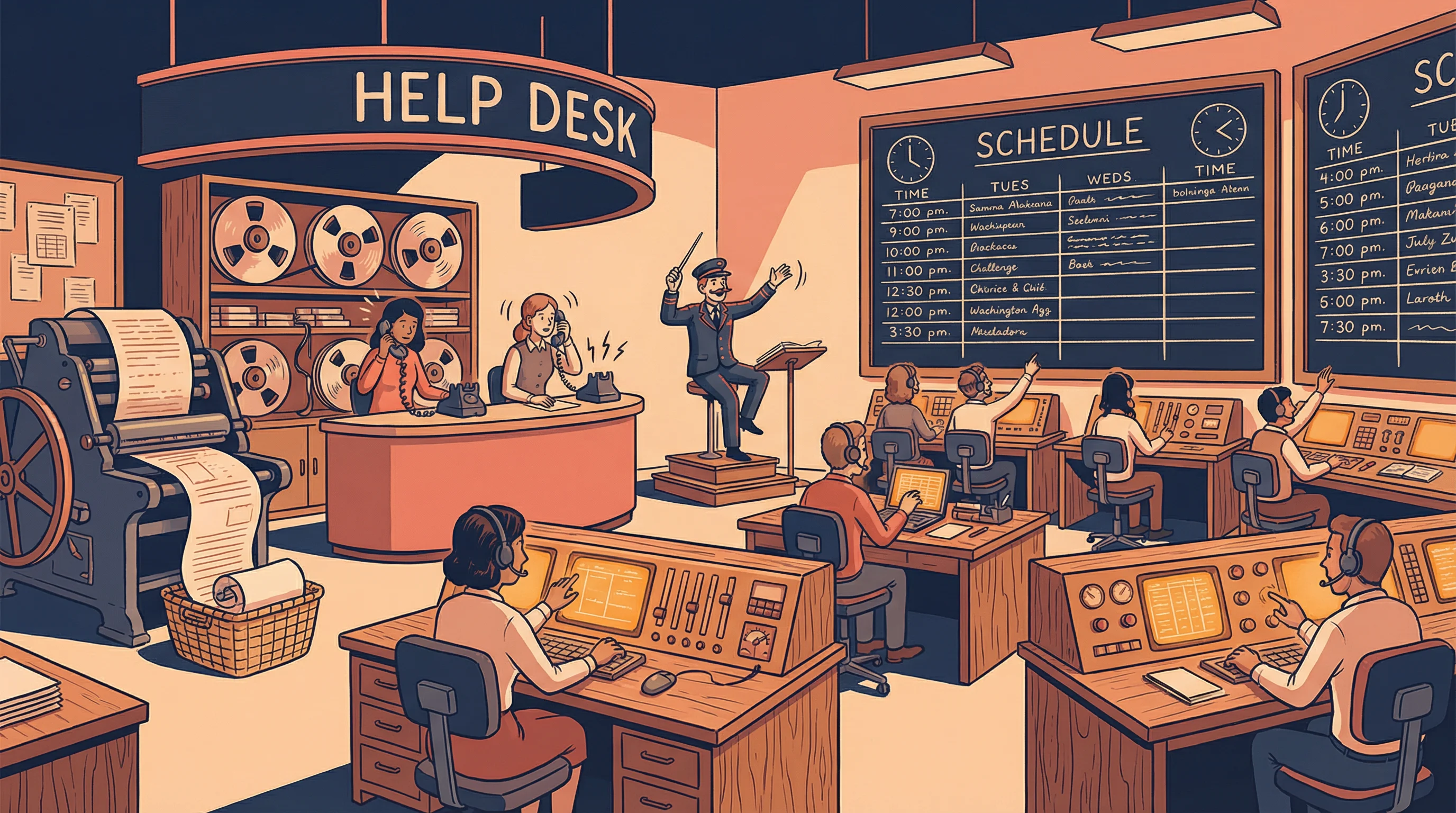
Help Desk / Service Desk
- Single point of contact (SPOC)
- Ticket tracking & escalation
- First-call resolution rate
- Knowledge base management
Operations Controls
- Print/output management
- Tape/media library controls
- Lights-out operations
- Segregation of duties in IT ops
Key Auditor Concern: Segregation of Duties (SoD)
Computer operators should not have access to modify programs, data, or system documentation. The auditor should verify that operations staff cannot make unauthorized changes to production.
The most critical control in IT operations is segregation of duties. Operators should never have access to change programs or data. The exam loves questions about what operators should and should not be able to do.
British Airways Bank Holiday 2017 outage — engineer accidentally powered down a data centre UPS. No automated monitoring detected it. 75,000 passengers stranded.
Reveal Answer
✓ Correct: A
Without automated monitoring and alerting, job failures can go undetected for extended periods, leading to missing outputs and cascading impacts. B describes a consequence but not the primary risk. C and D are minor operational effects.
Reveal Answer
✓ Correct: B
Segregation of duties is the primary preventive control. Operators should not have access to source code or production program libraries. A is detective, not preventive. C is administrative but not enforceable. D is unrelated.
Reveal Answer
✓ Correct: B
In lights-out operations, automated monitoring is the primary control because no humans are present. Without it, failures go undetected. A is important but secondary. C partially defeats the purpose of lights-out. D is a separate concern.
The batch job ran fine — the infrastructure underneath it is the next question.
Hardware & Infrastructure
Hardware & Infrastructure Components
Alex pulls up the infrastructure documentation. Payroll runs on a single physical server. No clustering. No failover. The infrastructure diagram is dated 2019. “Some things may have changed,” the infrastructure manager admits. Alex notes finding number two: single point of failure, no redundancy, stale documentation.
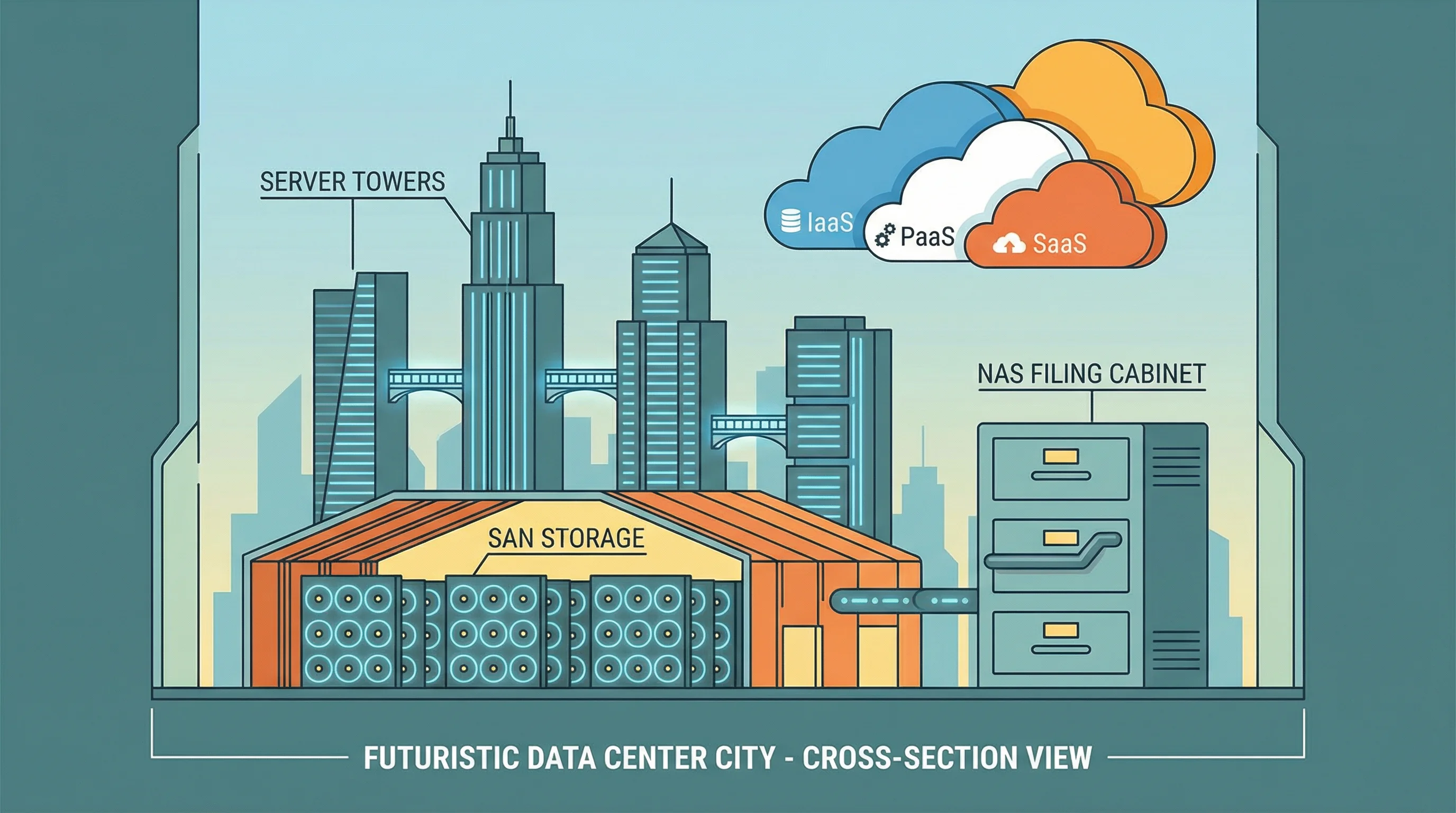
SAN (Storage Area Network)
- Dedicated high-speed storage network
- Block-level access
- Used for databases, email servers
- Expensive but high-performance
NAS (Network Attached Storage)
- File-level access over LAN
- Shared storage for file servers
- Simpler and cheaper than SAN
- Uses TCP/IP protocols
Mainframe
Centralized, high-reliability processing for critical batch jobs and transaction processing.
Client-Server
Distributed processing: thin clients (server-dependent) vs. thick clients (local processing).
Virtualization
Multiple virtual servers on one physical host. Key risk: hypervisor compromise.
Know SAN vs. NAS: SAN = block-level, dedicated network, high performance. NAS = file-level, over existing LAN, simpler. Virtualization’s biggest risk is a compromised hypervisor, which could affect all hosted VMs.
2021 Facebook 6-hour outage — BGP configuration change took down DNS servers. The team couldn’t remotely fix it because access tools also ran on affected infrastructure.
Reveal Answer
✓ Correct: A
A single point of failure for a critical system is an unacceptable risk. Clustering provides redundancy. B improves performance but not availability. C helps recovery but not prevention. D is useful but doesn't address the risk.
Reveal Answer
✓ Correct: B
The hypervisor is the single point of control for all VMs. If compromised, every VM on that host is at risk. A is incorrect. C is a maintenance concern, not the greatest risk. D is false — virtual servers can be backed up.
Reveal Answer
✓ Correct: B
SAN provides block-level access over a dedicated network, ideal for high-performance databases. NAS provides file-level access over LAN. DAS is directly connected to one server. Cloud object storage is accessed via APIs.
The server is there. But something between it and the users is broken — the network.
Network Management
The OSI Model — 7 Layers
A firewall rule was changed at 2am — blocking the payroll server’s outbound connection to the portal. Nobody reviewed the change. Nobody approved it. The logs showed the block clearly, but nobody was watching. Alex writes finding number three: uncontrolled change to a network device with no review process.

Use this phrase to remember all 7 layers top-to-bottom:
Or bottom-up: “Please Do Not Throw Sausage Pizza Away” (Physical → Application)
Key Network Devices
- Hub — Layer 1, broadcasts to all
- Switch — Layer 2, uses MAC addresses
- Router — Layer 3, uses IP addresses
- Firewall — Layers 3-7, filters traffic
Network Types
- LAN — Local, same building/campus
- WAN — Wide, connects distant LANs
- VPN — Encrypted tunnel over public network
- VLAN — Logical segmentation of a LAN
Know which devices operate at which OSI layers: hubs at Layer 1, switches at Layer 2, routers at Layer 3, firewalls at Layers 3-7. The exam frequently tests which layer a specific technology or attack targets.
Knight Capital 2012 — misconfigured routing on 1 of 8 servers caused $440M loss in 45 minutes. Configuration changes without review are one of the highest-risk IT operations.
Reveal Answer
✓ Correct: B
The core issue is an unapproved, unreviewed change. Change management requires approval, testing, and rollback plans before any production change. A is about detection, not prevention. C and D are unrelated to the approval process.
Reveal Answer
✓ Correct: B
Without network segmentation, an attacker who compromises any device (e.g., an IoT sensor) can reach critical servers directly. This is the greatest security risk of a flat network. Performance issues (A) are operational, not the greatest risk. IP addressing (C) and wireless (D) are unrelated to the flat network topology.
Reveal Answer
✓ Correct: B
Logging without review provides no security value. The logs captured the blocked payroll connection, but nobody was watching. A and C are operational concerns. D is secondary to the detection gap.
The firewall blocked the connection. But how is the team even managing this incident?
IT Service Management (ITIL)
ITIL Service Management Processes
One hour into the outage. Alex asks for the incident record. There isn’t one. The team is coordinating via WhatsApp. No ticket number. No severity classification. No escalation timeline. No formal ITIL process whatsoever. “We just fix things,” says the team lead. Alex adds finding number four.
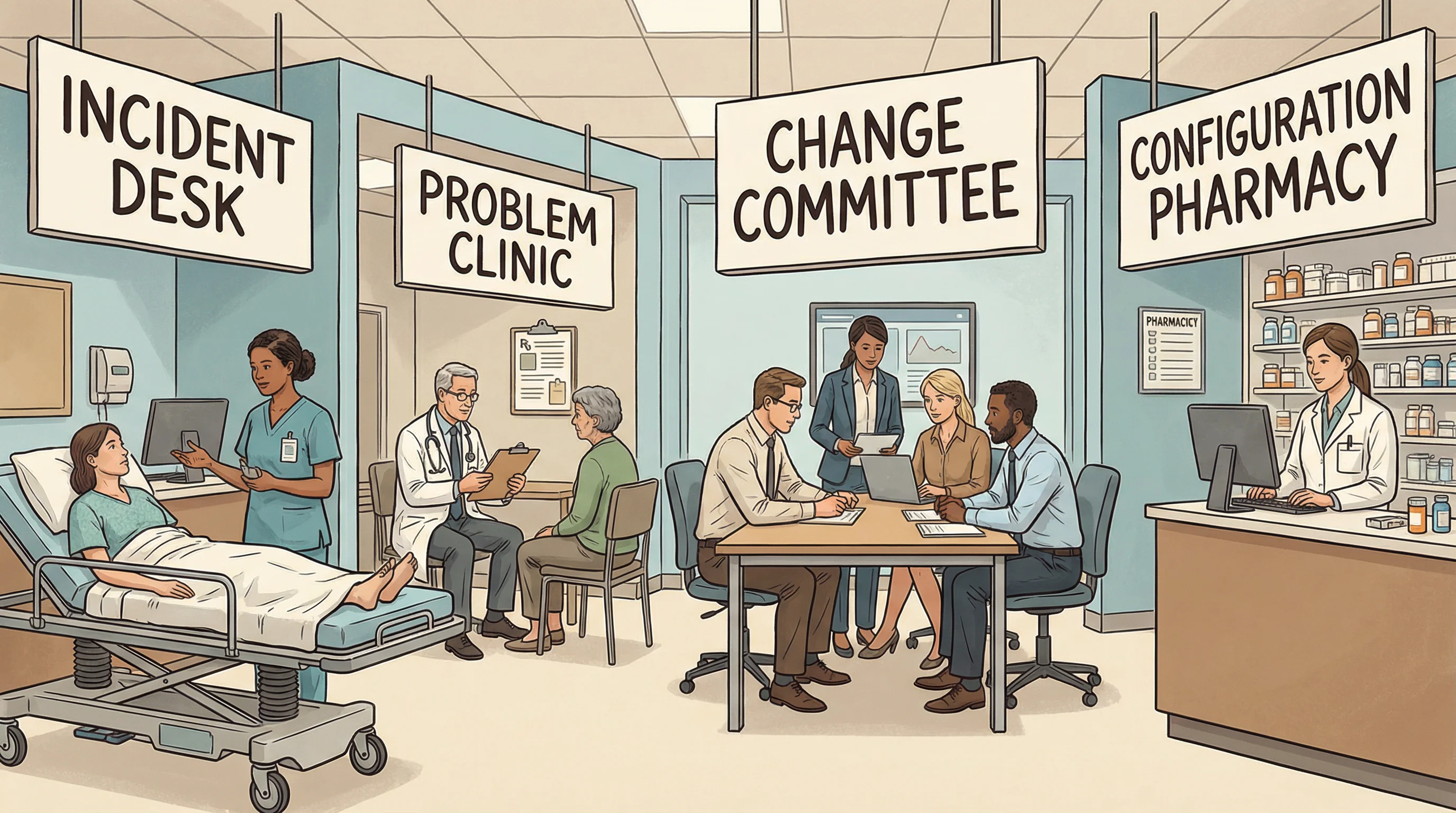
Incident Management
“Restore service ASAP”
- Focus: restore normal operations quickly
- Does NOT find root cause
- Workarounds are acceptable
- Measured by: time to restore
Problem Management
“Find and fix the root cause”
- Focus: identify underlying cause
- Prevents recurrence
- Creates known error database (KEDB)
- Proactive & reactive modes
Change Management
“Control all changes”
- Submit RFC (Request for Change)
- Impact analysis & approval
- CAB (Change Advisory Board)
- Rollback plan required
Configuration Management
“Know what you have”
- CMDB — Configuration Management DB
- Tracks all IT assets (CIs)
- Baseline configurations
- Supports all other ITIL processes
Think of it like a hospital: Incident = Emergency Room (stop the bleeding now), Problem = Diagnostic Lab (find out why the patient keeps getting sick). Emergency first, diagnosis second.
The #1 tested ITIL concept: Incident management restores service (workaround OK), problem management finds root cause (permanent fix). Change management requires a rollback plan. Every change must go through the CAB or emergency CAB (ECAB).
2003 Northeast blackout — utilities without formal incident management took days to restore power. Those with structured escalation had significantly faster recovery.
Reveal Answer
✓ Correct: B
Without formal incident logging, there is no audit trail, no data for trend analysis, and no evidence of compliance. A, C, and D are possible effects but the fundamental risk is the loss of documentation and pattern analysis capability.
Reveal Answer
✓ Correct: C
Problem management investigates root causes and prevents recurrence. Incident management only restores service. Change management handles modifications. Configuration management tracks assets.
Reveal Answer
✓ Correct: B
CAB review ensures changes are assessed for impact, approved, and have rollback plans before implementation. A is about recovery, not prevention. C and D don't address the process failure.
The process is broken. But what about the data sitting inside the payroll database?
Database Management
Database Management Systems
The payroll data is intact — the database wasn’t the problem. But querying it requires restarting the DBMS, which takes 40 minutes. Alex asks when the last database health check was performed. “We’d know if something was wrong,” says the DBA. Alex writes: reactive posture, no proactive monitoring or integrity checks.

1NF
Eliminate repeating groups — atomic values only
2NF
Remove partial dependencies on composite keys
3NF
Remove transitive dependencies — every non-key depends only on the primary key
Concurrency Controls
- Locking — Prevents simultaneous updates
- Deadlock — Two processes waiting for each other
- Timestamping — Orders transactions by time
- Optimistic — Allow all, check at commit
Data Integrity
- Referential — Foreign keys match primary keys
- Entity — Primary keys are unique, not null
- Domain — Values within valid range
- ACID — Atomicity, Consistency, Isolation, Durability
Atomicity — all or nothing. Consistency — valid state before and after. Isolation — transactions don’t interfere. Durability — once committed, it’s permanent. Think of a bank transfer: it must be all four or your money vanishes.
Know ACID properties cold — especially Atomicity (all or nothing). For normalization, 3NF is the exam standard: “every non-key attribute depends on the key, the whole key, and nothing but the key.” Referential integrity = foreign key validity.
Equifax 2017 — database activity monitoring was misconfigured, generating no alerts for 78 days while 147M records were exfiltrated.
Reveal Answer
✓ Correct: B
The statement reveals reliance on reactive detection rather than proactive health checks, integrity validation, and monitoring. Without scheduled checks, problems may go undetected until they cause outages.
Reveal Answer
✓ Correct: B
Direct write access combined with no audit trail creates a fraud risk — the DBA could alter financial records with no way to detect the changes. This is a critical segregation-of-duties and detective control failure. Performance (A) is operational. Schema issues (C) are a technical concern. Backup gaps (D) are secondary to the data integrity risk.
Reveal Answer
✓ Correct: B
The auditor's primary concern is the data integrity risk from redundant, inconsistent data — this is what drives the need for action. The trap is A — while normalisation can affect performance, the auditor should focus on the data integrity risk first. Cost (C) and team skills (D) are implementation considerations, not the auditor's primary concern.
The database is fine. But is anyone actually watching the system’s vital signs?
System Performance Monitoring
Performance Monitoring & Capacity Planning
Alex asks to see the performance dashboard. There isn’t one. The team uses command-line tools when something feels slow. What’s the payroll system’s SLA for availability? Nobody knows. It was never defined. No baseline metrics, no capacity planning, no thresholds. Finding number six: no performance monitoring framework.

Key Performance Metrics
- CPU utilization — processor workload %
- Memory usage — RAM consumption
- I/O throughput — disk read/write speed
- Network latency — response delay
- Transaction rate — TPS (transactions/sec)
Capacity Planning
- Forecast future resource needs
- Trend analysis on historical data
- Model “what-if” scenarios
- Balance cost vs. performance
- Prevent bottlenecks proactively
Uptime / Availability
99.9% = 8.77 hours downtime/year. 99.99% = 52.56 minutes/year. Know the “nines.”
Response Time
Maximum acceptable delay for user transactions. Measured at the user interface level.
Throughput
Volume of work completed per unit time. Must handle peak loads without degradation.
SLAs define the minimum acceptable service levels. An auditor should verify that SLAs are documented, measurable, monitored, and that penalties for non-compliance are defined. Capacity planning should be proactive, not reactive.
Delta Air Lines 2016 — power control module failure cascaded for hours because no real-time monitoring thresholds triggered an alert. Cost: $150M+.
Reveal Answer
✓ Correct: B
Without an SLA, there is no defined acceptable level of service, making it impossible to measure compliance, trigger escalations, or hold anyone accountable. A, C, and D are secondary effects.
Reveal Answer
✓ Correct: B
Proactive trend analysis uses historical data to predict future needs before problems occur. A is reactive. C is wasteful without data-driven needs. D restricts business operations.
Reveal Answer
✓ Correct: C
99.9% uptime allows 0.1% downtime = 8,760 hours x 0.001 = 8.76 hours per year. 99.99% = 52.56 minutes. 99% = 3.65 days.
Operations are unmonitored. Now Alex turns to the bigger question: what if the whole building goes down?
Business Continuity Planning (BCP)
BCP Lifecycle & Business Impact Analysis
Alex asks to speak with the BCP coordinator. He’s on leave. The deputy doesn’t know where the BCP document is stored. When it’s finally located on a shared drive, it references a hot site whose contract was not renewed eighteen months ago. The BCP was last tested two years ago. Alex’s findings are multiplying.
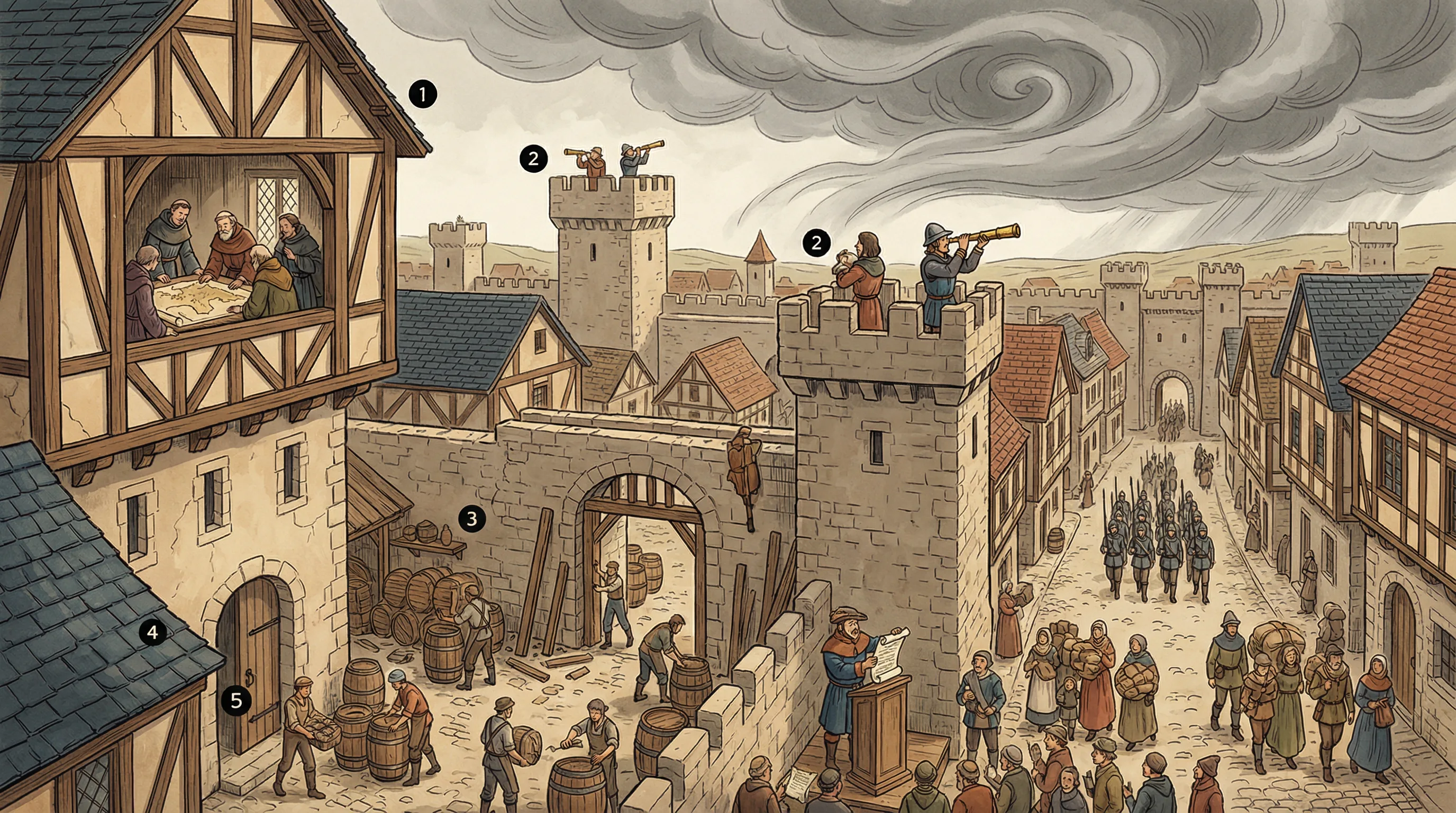
Project Initiation
Senior management sponsorship, scope definition, team formation
BIA
Business Impact Analysis — identify critical functions & maximum tolerable downtime
Strategy Development
Select recovery strategies for each critical function
Plan Development
Document procedures, roles, responsibilities, contacts
Testing & Training
Exercise the plan, train staff, validate recovery
Maintenance
Regular updates, reviews, and improvements
Business Impact Analysis (BIA) — The Foundation
The BIA is the first major step after project initiation. It identifies:
- Critical business processes
- Maximum Tolerable Downtime (MTD)
- RTO & RPO for each process
- Resource dependencies
- Financial impact of downtime
- Operational impact over time
Checklist
Review the plan on paper
Walkthrough
Tabletop discussion of the plan
Simulation
Rehearse specific scenarios
Parallel
Activate recovery site alongside primary
Full Interruption
Shut down primary, switch to backup — highest risk
BIA must be completed BEFORE developing recovery strategies. Senior management must sponsor the BCP — this is non-negotiable. The most realistic test is a full interruption test, but a parallel test is the most common realistic test because it doesn’t disrupt primary operations.
Hurricane Sandy 2012 — several financial institutions found their BCP alternate sites were in the same flood zone as primary sites.
Reveal Answer
✓ Correct: B
An expired recovery site contract in the BCP indicates that the plan is not being maintained and updated. Regular review should catch such gaps. A, C, and D are assumptions not supported by the facts.
Reveal Answer
✓ Correct: C
A parallel test activates the recovery site while primary operations continue, providing realistic validation without risk. Full interruption is most realistic but disrupts operations. Checklist and walkthrough are theoretical exercises.
Reveal Answer
✓ Correct: B
The BIA identifies critical functions, MTD, RTO, and RPO — all of which drive recovery strategy selection. You cannot choose a strategy without knowing what you're protecting and how quickly it must recover.
The BCP is a paper exercise. What about the actual disaster recovery specifics?
Disaster Recovery Planning (DRP)
RTO, RPO & Recovery Sites
Alex asks the critical questions. RTO for payroll? Nobody knows. RPO? Nobody knows either. Backups run daily at 3am. It’s now 11am. If they had to restore, that’s 8 hours of data loss. For a payroll system processing 2,400 employees, that’s unacceptable — but nobody ever defined what “acceptable” means.
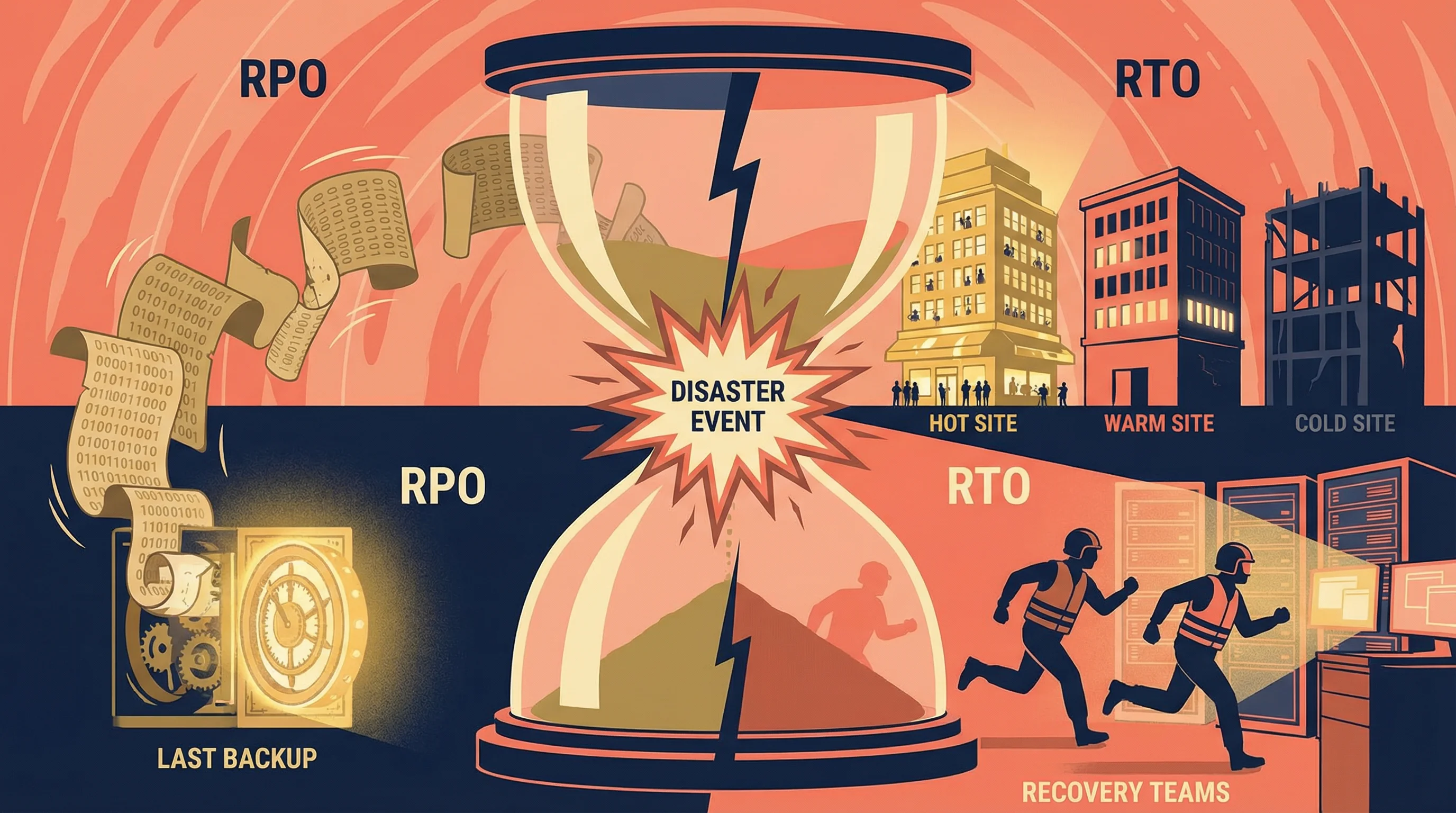
RPO — Recovery Point Objective
“How much data can we lose?”
- Looks BACKWARD from disaster
- Maximum tolerable data loss
- Determines backup frequency
- RPO = 4 hrs → backup every 4 hrs
RTO — Recovery Time Objective
“How fast must we recover?”
- Looks FORWARD from disaster
- Maximum tolerable downtime
- Determines recovery site type
- RTO = 0 → need a hot site
RPO = Recovery Point = the point in the past you rewind to (data loss). RTO = Recovery Time = time to get back up (downtime). Point looks back, Time looks forward.
This is the most heavily tested concept in Domain 4. RPO drives backup strategy, RTO drives recovery site selection. A hot site is ready immediately but is the most expensive. Also know: reciprocal agreements are least reliable because they depend on another organization’s capacity.
2011 Thailand floods destroyed hard drive plants. Companies without documented RTO/RPO had no criteria for activating alternate suppliers.
Reveal Answer
✓ Correct: B
The last backup was at 3am. Failure at 11am means 8 hours of data since the last backup. This exceeds the 4-hour RPO, indicating the backup frequency is inadequate for the defined RPO.
Reveal Answer
✓ Correct: C
A hot site has fully configured hardware with near real-time data replication, enabling recovery in minutes to hours. Cold sites take days/weeks. Warm sites take hours/days. Reciprocal agreements are the least reliable option.
Reveal Answer
✓ Correct: B
With a midnight backup and a 3pm failure, up to 15 hours of data could be lost. The RPO of 4 hours means the organisation can only tolerate losing 4 hours of data — the backup frequency is grossly inadequate. The trap is A — daily backups do NOT meet a 4-hour RPO. C is wrong because RTO measures recovery time, not data loss. D appeals to a false sense of "industry standard."
Recovery objectives are undefined. But what about the actual backups — do they even work?
Backup & Recovery
Backup Types & Strategies
Last backup: last night at 3am. Last backup test: 14 months ago. The team can confirm backups complete, but nobody has verified that a restore actually produces a working system. Alex notes this separately — it’s a finding that stands on its own. A backup you’ve never tested is a hope, not a control.
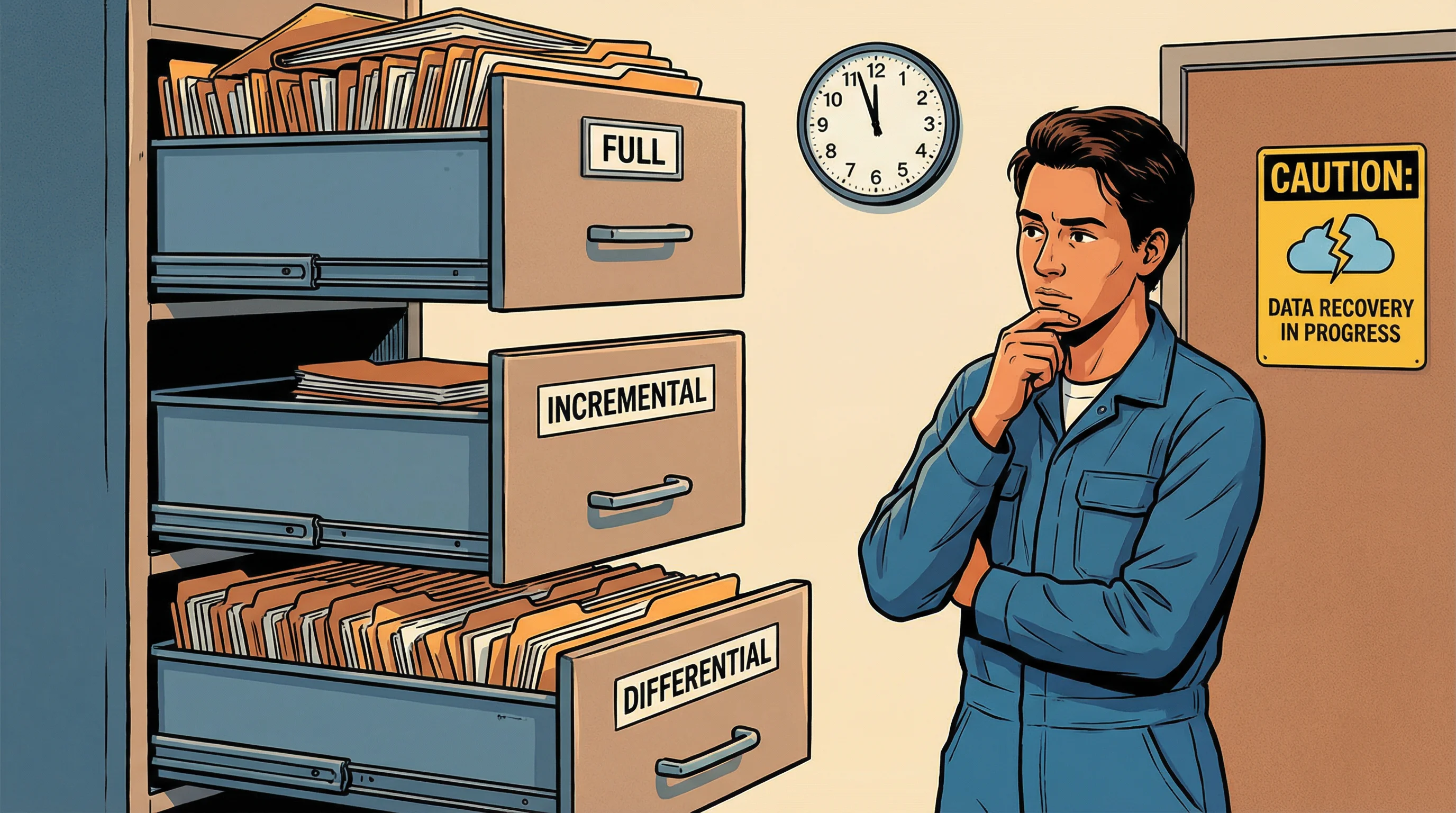
Full Backup
- Copies ALL data every time
- Slowest to create
- Fastest to restore
- Resets archive bit
Incremental
- Only data changed since LAST backup (any type)
- Fastest to create
- Slowest to restore (need all incrementals)
- Resets archive bit
Differential
- Data changed since last FULL backup
- Grows larger each day
- Restore = full + latest differential
- Does NOT reset archive bit
Off-site Storage & Media Rotation
- Grandfather-Father-Son (GFS) — daily/weekly/monthly rotation
- Off-site vaulting — store backups at a separate location
- Electronic vaulting — batch transfer to off-site
- Remote journaling — real-time transaction log transfer
Key distinction: Incremental backs up since the LAST backup (any type), Differential backs up since the last FULL backup. For recovery, differential is faster than incremental (need only 2 sets vs. potentially many). Off-site backups are essential — same building = same disaster.
GitLab 2017 — accidentally deleted primary database. Backup system had been failing silently for months. Only 5GB of 300GB was recoverable. Regular testing, not just running, matters.
Reveal Answer
✓ Correct: B
Successful restoration tests prove that backups actually work and can produce a usable system. Completion logs only confirm the backup ran, not that data is recoverable. Offsite storage and vendor certification don't verify recoverability.
Reveal Answer
✓ Correct: C
Incremental restore requires the last full backup plus every incremental since then (potentially many sets). Differential needs only full + last differential (2 sets). Full needs only one set.
Reveal Answer
✓ Correct: B
Without restoration testing, there is no assurance that backups produce working systems. GitLab's 2017 incident proved that running backups and having working backups are very different things.
Backups exist but are untested. Three hours in — the team finally finds the fix.
Incident Management
Incident Response Lifecycle
Three hours in, the misconfigured firewall rule is identified and reversed. The payroll portal comes back online. The team relaxes. Alex does not. She has been watching the entire response unfold without a single documented step. She now has 11 findings — and the incident itself just became finding material for how not to run incident response.
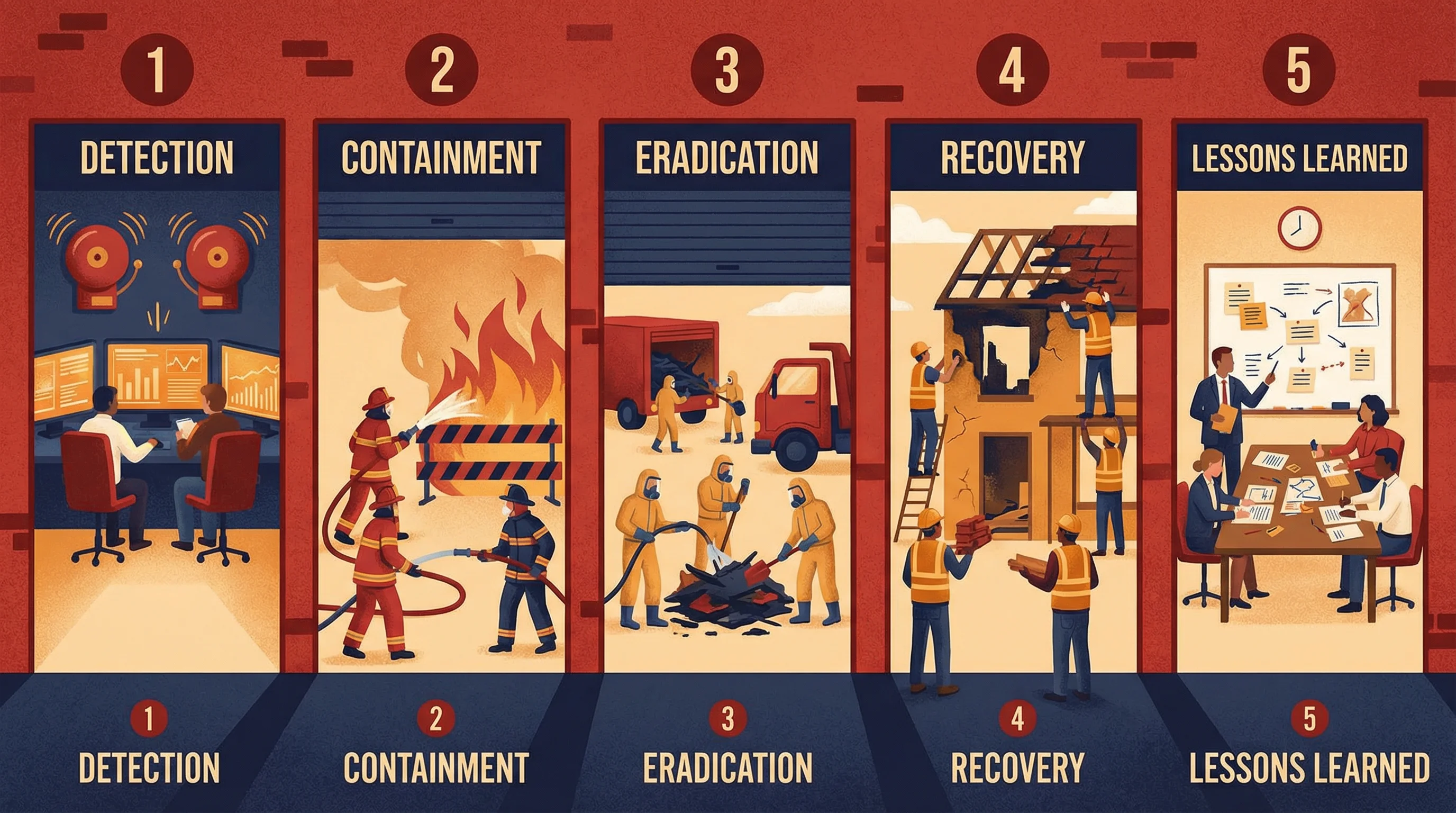
Detection
Identify the incident through monitoring, alerts, or reports
Containment
Limit the damage — isolate affected systems
Eradication
Remove the root cause — clean malware, patch vulnerability
Recovery
Restore systems to normal operations, verify integrity
Lessons Learned
Post-mortem review — what went wrong, what to improve
Remember the order with: “Don’t Cry, Every Recovery Leads” to better security.
Incident Response Team (IRT)
- Pre-designated team with clear roles
- Must have management authority
- Cross-functional (IT, legal, HR, PR)
- 24/7 contact information maintained
- Regular training and exercises
Key Documentation
- Incident log with timestamps
- Chain of custody for evidence
- Classification & prioritization
- Communication plan (internal & external)
- Post-incident report
After detection, the FIRST priority is always containment — stop the bleeding before investigating. “Lessons learned” is the most frequently skipped step in practice — the exam considers it mandatory. Preserve evidence chain of custody for potential legal proceedings.
Target 2013 — FireEye alerts were dismissed. Breach persisted 16 days. Detection without response is not security.
Reveal Answer
✓ Correct: B
Containment is always the first priority after detection — limit the blast radius. Forensics and root cause come after containment. Law enforcement notification depends on the incident type and may not be the first step.
Reveal Answer
✓ Correct: D
Organizations often rush back to normal operations and skip the post-incident review. ISACA considers lessons learned essential for improving the incident response process and preventing recurrence.
Reveal Answer
✓ Correct: B
Without documentation, there is no evidence for audit, no data for trend analysis, no compliance evidence, and no basis for lessons learned. The other options are secondary consequences.
The system is back. But Alex has noticed something troubling on a Finance laptop.
End-User Computing & Shadow IT
End-User Computing Risks & Controls
While the payroll portal was down, Finance pulled out their backup plan: a parallel payroll spreadsheet maintained “just in case.” It’s on a personal laptop. Unsecured. Unencrypted. It contains salary data for all 2,400 employees. The Finance manager doesn’t see the problem. Alex sees finding number eleven — and possibly the worst one yet.
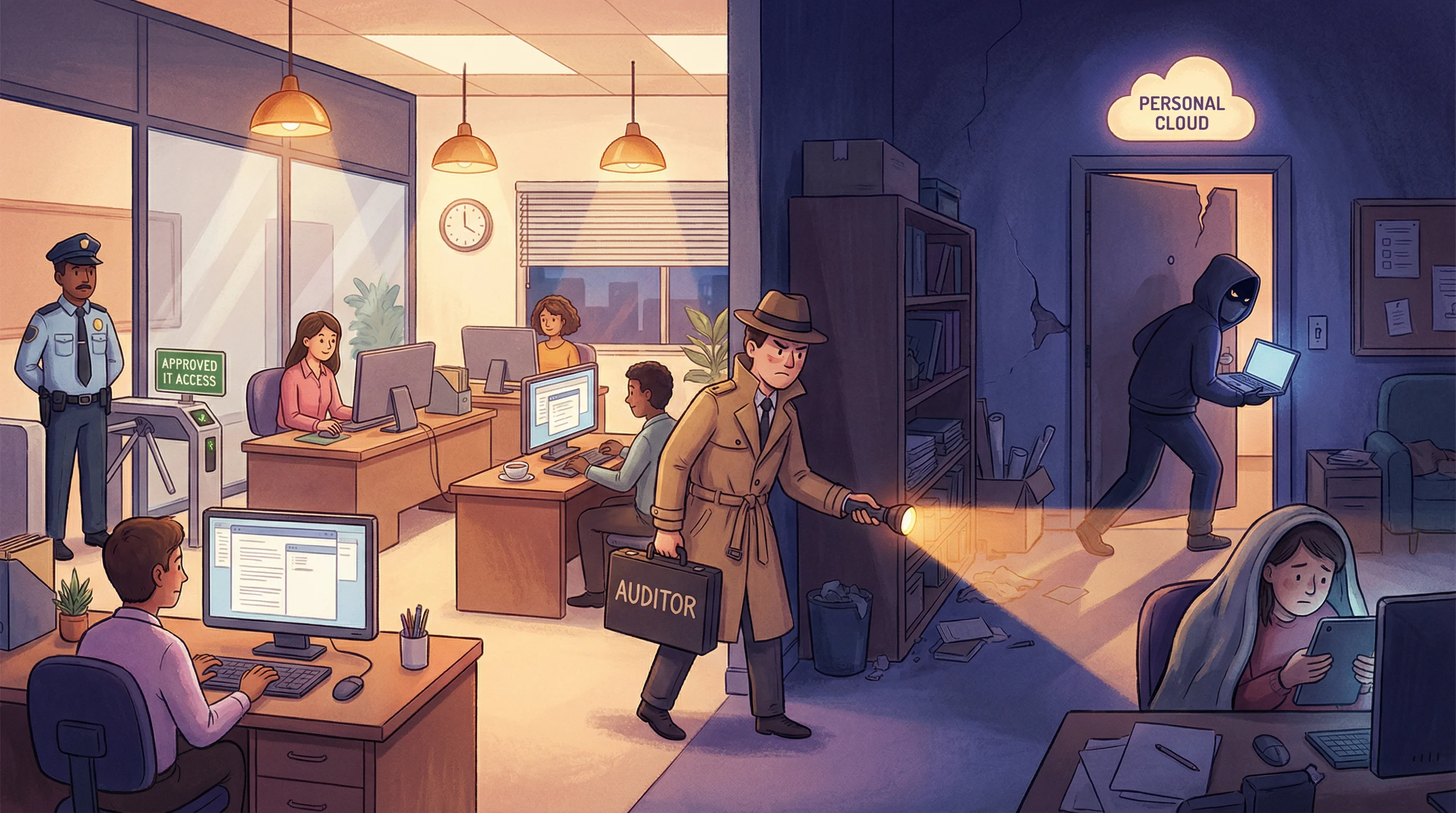
Shadow IT Risks
- Unpatched, unmanaged devices
- Data stored outside corporate control
- No backup or recovery
- Compliance violations (GDPR, HIPAA)
- Unauthorized cloud services (SaaS)
- Spreadsheet-based “applications”
Recommended Controls
- End-user computing policy
- Application whitelisting
- CASB (Cloud Access Security Broker)
- DLP (Data Loss Prevention)
- Regular discovery and inventory
- User awareness training
EUC Application Risks
End-user developed applications (spreadsheets, Access databases, macros) are high-risk because they typically lack:
- Change management controls
- Version control
- Input validation
- Documentation
- Access controls
- Audit trails
The greatest risk of end-user computing is lack of IT controls — no change management, no backups, no audit trails. Shadow IT bypasses all corporate governance. The auditor’s first recommendation should be a comprehensive EUC policy, not banning personal devices outright.
UK government 2012 — fined £150,000 after employee stored 24,000 people’s personal data on an unencrypted personal laptop that was stolen.
Reveal Answer
✓ Correct: B
Sensitive personal data on an unmanaged, unencrypted personal device is a critical data protection and compliance risk. Loss or theft could result in a reportable breach. A and C are minor. D is a symptom of the larger control gap.
Reveal Answer
✓ Correct: B
A comprehensive EUC policy establishes governance without being punitive. Blocking all devices may disrupt operations. Monitoring personal devices raises privacy issues. Termination is disproportionate.
Reveal Answer
✓ Correct: B
DLP technology can detect and prevent sensitive data from being copied to unauthorized locations, including personal devices and cloud services. Training is helpful but not enforceable. Passwords and audits don't directly address the issue.
Shadow IT is everywhere. Could moving to the cloud fix all of this?
Cloud Computing
Cloud Service & Deployment Models
Meridian is considering moving payroll to the cloud. The CFO corners Alex: “Would this have happened in the cloud?” Alex pauses. “Possibly. Just differently. The firewall misconfiguration? That becomes a security group misconfiguration. The missing monitoring? That’s still your responsibility. The cloud changes where the problems live, not whether they exist.”
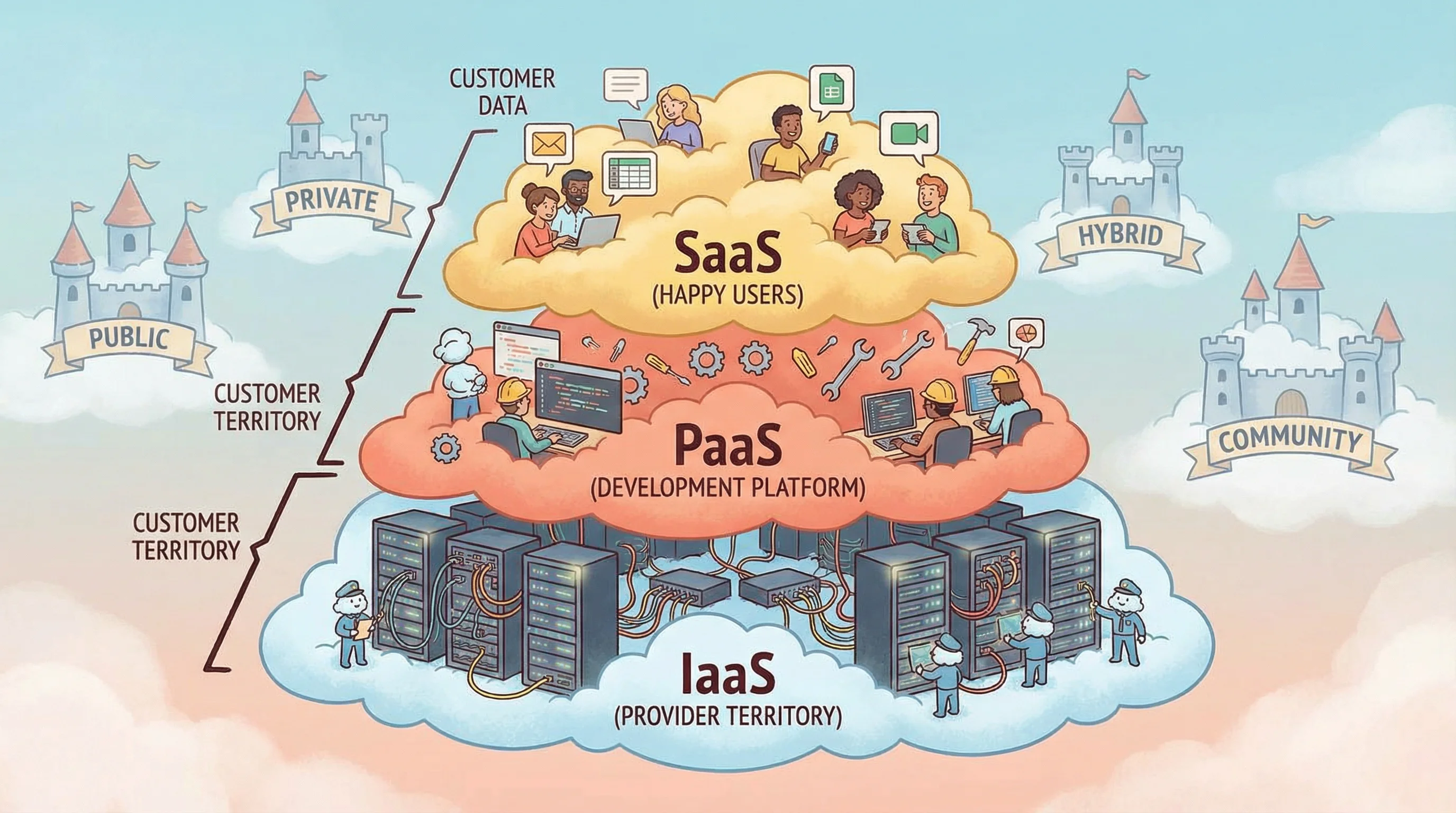
IaaS
Infrastructure as a Service
- Provider manages: hardware, networking, storage
- Customer manages: OS, apps, data, middleware
- Most customer responsibility
- Example: AWS EC2, Azure VMs
PaaS
Platform as a Service
- Provider manages: infra + OS + runtime
- Customer manages: apps and data
- Shared responsibility
- Example: Heroku, Google App Engine
SaaS
Software as a Service
- Provider manages: everything
- Customer manages: data and access
- Least customer responsibility
- Example: Gmail, Salesforce, Office 365
☁️ Public Cloud
Shared infrastructure, multi-tenant. Lowest cost, least control. Managed by third party.
🏰 Private Cloud
Dedicated to one organization. Most control, highest cost. Can be on-premises or hosted.
🔗 Hybrid Cloud
Combination of public and private. Sensitive data on private, burst to public for capacity.
🏘️ Community Cloud
Shared by organizations with common concerns (e.g., healthcare, government). Cost shared.
Key Cloud Audit Concerns
- Data sovereignty — where is data stored?
- Right to audit — contractual access
- Vendor lock-in — portability risks
- Multi-tenancy risks — data isolation
- SOC 2 reports — assurance from provider
- Incident notification — SLA obligations
Think of a pizza analogy: IaaS = you buy ingredients and cook (most work). PaaS = you get a ready kitchen (just cook your recipe). SaaS = you order delivery (just eat). The more “as a Service,” the less you manage.
Even when using cloud services, the ORGANIZATION remains responsible for its data. The cloud provider is responsible for infrastructure security, but the customer must still protect data and manage access. An auditor should request SOC 2 Type II reports from the cloud provider as primary assurance evidence.
Capital One 2019 — 100M customer records breached from AWS. Misconfigured WAF was Capital One’s responsibility under shared responsibility model, not AWS’s.
Reveal Answer
✓ Correct: B
The shared responsibility model means the organization always retains responsibility for data, access management, and application-level security. Cloud changes where risks live, not whether they exist.
Reveal Answer
✓ Correct: C
In IaaS, the customer manages OS, applications, data, and middleware. In PaaS, the customer manages apps and data. In SaaS, only data and access. IaaS = most customer responsibility.
Reveal Answer
✓ Correct: B
SOC 2 Type II reports provide independent assurance over a period of time about the effectiveness of the provider’s controls. Marketing materials and emails are not audit evidence. ISO certification confirms a framework exists but not effectiveness over time.
The payroll system is back. Alex has 11 findings.
By 1pm, everything is working again. The ops team is relieved. Alex is still writing. Three hours of incident taught her more about Meridian’s IT operations than three weeks of documentation review. The systems work — mostly. The controls around them are full of gaps. And somewhere in Finance, a laptop with 2,400 salary records is sitting unlocked on a desk. She adds that to finding number 12.
⚠️ Top 10 Exam Traps — Domain 4
✓ Hot site has pre-configured equipment but still requires current backups to be loaded — not instantaneous
✓ RPO = maximum acceptable DATA LOSS (age of restored data). RTO = how long RECOVERY takes
✓ Full + incremental is often more practical. Best strategy depends on RPO
✓ Incident management restores SERVICE. Problem management finds ROOT CAUSE
✓ Cloud transfers some risks — under shared responsibility, significant risks remain with the organisation
✓ Only if tested against realistic scenarios, kept current, includes all critical systems
✓ Normalisation improves DATA INTEGRITY — it can hurt performance (more joins). Denormalisation is used for performance
✓ BCP ownership = SENIOR MANAGEMENT. IT operations supports recovery
✓ Encryption + physical security + off-site storage + access control. All required
✓ IDS detects and alerts (detective). IPS can block (preventive + detective)